Garage Door Not Responding to Remote? 5 Common Fixes for Phoenix Homeowners
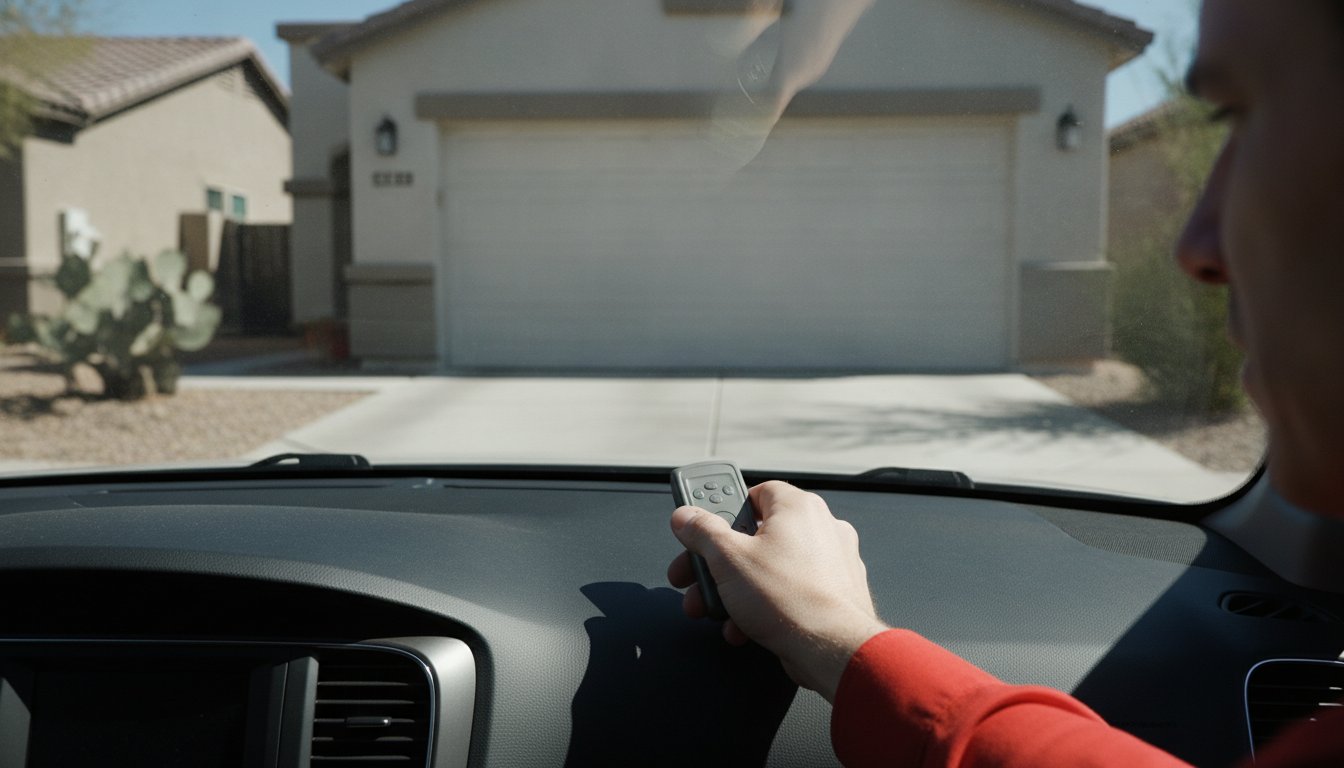
You pull into your driveway after a long day in the Phoenix sun, press your clicker, and nothing happens. That sudden realization that your garage door is not responding to remote signals often leads to immediate stress. You might worry about being locked out of your own home or wonder if you're facing a costly motor replacement. It's a common frustration for many local homeowners, but it doesn't always mean your opener is broken.
We understand that a malfunctioning door is a major security concern and a massive inconvenience. Most of the time, the fix is much simpler than you think. This guide provides an expert look at how to troubleshoot your unresponsive remote, covering everything from basic battery issues to complex signal interference. You'll learn how to determine if your opener is truly damaged or if a quick adjustment can restore your peace of mind. We've outlined five straightforward fixes that can get your door moving again without the need for specialized tools.
Key Takeaways
- Start with the basics by testing battery health and cleaning contact points to eliminate simple power issues.
- Verify your wall station settings to ensure "Lock Mode" hasn't accidentally left your garage door not responding to remote signals.
- Identify how radio frequency interference from modern LED bulbs could be "drowning out" your clicker's signal.
- Learn the re-syncing process using your motor's color-coded "Learn" button to restore a lost connection.
- Recognize when a clicking motor or limited range indicates a mechanical failure that requires professional repair.
Start with the Basics: Battery Health and Signal Path
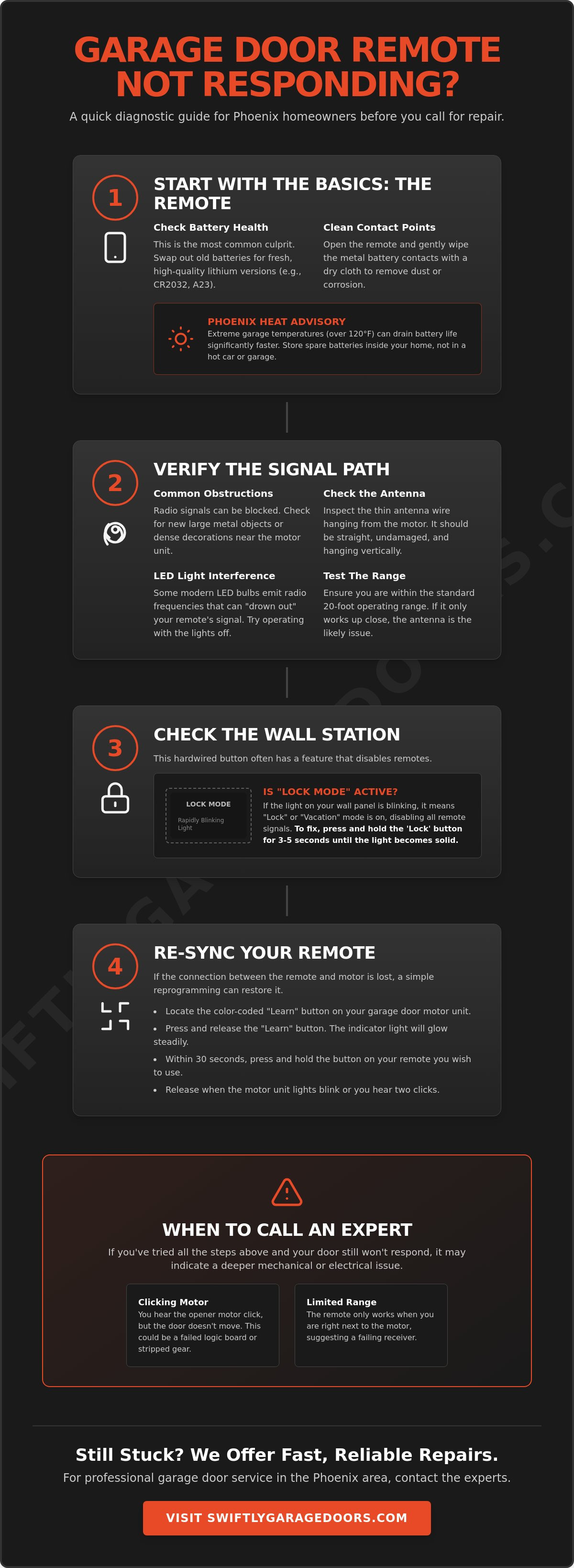
When you find your garage door not responding to remote signals, don't assume the motor has failed. Start with the most likely culprit: the power source. Most remotes rely on small coin-cell or alkaline batteries that can lose their charge without warning. Swap out your old batteries for high-quality lithium versions, typically a CR2032 or an A23, depending on your specific model. These provide a more consistent voltage than standard alkaline options.
While you have the remote open, take a moment to inspect the internal components. Clean the battery contact points using a dry cloth to remove any dust or minor corrosion. Even a microscopic layer of oxidation can break the electrical connection and stop your signal in its tracks. If the contacts look bent, gently press them back into place to ensure they maintain a firm grip on the new battery.
To better understand why your remote might be failing, watch this helpful video:
The Impact of Phoenix Heat on Remote Batteries
Living in the Valley means dealing with extreme garage temperatures that often exceed 120 degrees during the summer months. This intense heat is an electronic killer. In 2026, technical data confirms that high heat increases internal battery resistance, which drains the capacity of coin-cell batteries much faster than in cooler climates. You might find your remote works perfectly in the cool morning but fails during the peak heat of the afternoon. To prevent being locked out, we recommend keeping your spare batteries inside a climate-controlled area of your home rather than in a hot garage drawer or a glove box.
Testing the Signal Range
If new batteries don't solve the issue, check your signal path. Verify you are within the standard 20-foot operating range of the opener. Modern systems use rolling code technology to keep your home secure, but this encrypted signal still needs a clear path to the receiver. Most cases of a garage door not responding to remote commands come down to simple physical blocks. Check for these common obstructions:
- Metal Shelving: Large metal objects near the motor can deflect radio waves.
- Holiday Decorations: Dense strings of lights or foil banners can act as a shield.
- Antenna Position: Inspect the small antenna wire hanging from the motor head. Ensure it isn't damaged, kinked, or accidentally tucked inside the metal motor casing.
Try operating the remote from inside the garage. If it works standing next to the motor but fails from the driveway, your antenna is likely the problem. Straighten the wire so it hangs down vertically to maximize its reception range.
Check the Wall Station "Lock" and Power Settings
If your batteries are fresh but your garage door is not responding to remote clicks, walk over to the wall station inside your garage. This hardwired button often holds the secret to an unresponsive system. Many homeowners overlook the "Lock" or "Vacation" feature, which is designed to enhance security by disabling all radio signals from handheld transmitters. Understanding how garage door remotes work helps clarify why this feature exists; it essentially shuts down the receiver's ability to process outside signals, preventing unauthorized entry while you're away.
Look at the main button on your wall panel. Is the small LED light blinking rapidly? If so, Lock Mode is active. This frequently happens when children play with the buttons or when a homeowner accidentally bumps the panel while carrying groceries. To fix this, press and hold the "Lock" button for three to five seconds. The light should return to a steady glow, and your remotes will immediately regain control. Always confirm the wall button still opens the door; if the wall station itself is dead, you might be facing a total power failure or a tripped circuit breaker.
What is Garage Door Lock Mode?
Lock Mode is a built-in security protocol found on most modern systems. It acts as a digital deadbolt for your radio receiver. On LiftMaster and Chamberlain wall stations, this is typically a small button with a padlock icon. If that icon is flashing, your handheld remotes are effectively invisible to the opener. It's a great feature for long trips, but it's a major headache when it's triggered by mistake. A quick visual check of the wall station is the fastest way to rule out this common "ghost" issue.
Power Surges and Logic Board Resets
Phoenix is famous for intense monsoon storms that bring heavy dust, wind, and lightning. These weather events often cause minor power surges that can "confuse" the sensitive electronics in your opener. If the wall button works but the remotes don't, try a hard reset. Unplug the motor from the ceiling outlet for 60 seconds. This allows the capacitors to drain and forces the logic board to reboot, often clearing temporary glitches that left your garage door not responding to remote commands.
If a reset doesn't work and the wall button still functions, the surge may have fried the radio receiver on the logic board. You'll know this is the case if the "Learn" light refuses to blink or if the system won't accept any new remote programming. When electronics fail after a storm, you might need a professional garage door repair to replace the logic board or the entire unit.
Troubleshooting Radio Frequency and LED Interference
Have you recently upgraded the lighting in your garage? While energy efficient bulbs are great for your utility bill, they are often the hidden reason for a garage door not responding to remote signals. Many modern LED and CFL bulbs use switching power supplies that generate significant radio frequency noise. This electronic chatter can actually drown out the signal from your handheld clicker, making it impossible for the motor to hear the command to open. It is a common problem that leaves homeowners baffled because the wall button continues to work perfectly while the remotes fail.
To test this, simply unscrew the bulbs from your opener and try the remote again. If the door moves perfectly, you have confirmed that your lighting is the culprit. Cheap, unshielded LED bulbs are the most common offenders. We recommend replacing them with specific "Garage Door Rated" LED bulbs. These are engineered with extra shielding to prevent signal clashing and are built to withstand the constant vibrations of a moving door. It's a simple swap that restores immediate convenience.
Common Sources of RF Interference
Your garage isn't just fighting with its own lightbulbs. Household items like baby monitors, wireless security cameras, and older wireless doorbells also operate on similar frequencies. In the Phoenix area, proximity to Luke Air Force Base or Sky Harbor International Airport can occasionally cause intermittent signal issues due to powerful radar and communication equipment. The 315MHz and 390MHz frequencies used by most openers are easily crowded by these high-powered devices. If you notice your remote fails only at certain times of the day, a nearby electronic device is likely the source of the jam.
Fixing the Motor Antenna
Sometimes the problem is physical rather than electronic. Locate the small purple or gray wire hanging from your motor head. This is your antenna. Over time, it can become kinked or pressed against the metal chassis, which severely limits its range and leads to your garage door not responding to remote commands. Straighten the wire so it hangs freely toward the floor. Never cut or splice this wire; its specific length is tuned to the opener's frequency. If your Phoenix home has heavy foil-backed insulation to combat the heat, your garage may be acting like a shield. In these cases, you might need an antenna extension kit to bring the receiver wire outside the metal-lined space.
How to Reprogram and Re-Sync Your Garage Door Remote
If you've checked the batteries and cleared the signal path but your garage door is still not responding to remote commands, the digital connection between your devices has likely dropped. This "handshake" can break after a local power flicker or if the remote has been sitting in a drawer for months. To restore the connection, you must re-sync the handheld transmitter to the motor’s logic board.
Start by locating the "Learn" button on your motor head. You'll usually find this behind the plastic light lens or on the rear panel near the antenna wire. The color of this button is critical because it identifies the specific frequency your system uses. Competitors often skip this detail, but knowing your color ensures you have a compatible remote.
- Yellow: Uses Security+ 2.0 technology (310, 315, and 390 MHz).
- Purple: Operates on the 315 MHz frequency.
- Orange or Red: Uses the older 390 MHz Security+ rolling code.
- Green: Found on much older "Billion Code" systems from the early 90s.
The programming sequence is simple but requires speed. Press and release the Learn button once. A small LED indicator will light up. Do not hold the button down; holding it for more than six seconds will erase every remote currently programmed to the door. Once the light is on, you have exactly 30 seconds to press the button on your remote. The opener’s work lights will flash or the motor will click twice to signal a successful sync.
Identifying Your Opener Type
The Yellow Learn button is the gold standard for modern security, utilizing encrypted signals that are nearly impossible for thieves to intercept. If you find your garage door keypad not working, you can often fix it using these same steps. Simply enter your PIN on the keypad instead of pressing a remote button after hitting the "Learn" button on the motor. If your opener uses "Dip Switches" (a row of tiny toggles), it predates digital syncing and requires manual alignment of the switches in both the remote and the motor.
Clearing the Memory
There are times when a fresh start is necessary for your security. If you’ve recently lost a remote or had one stolen, you should perform a full memory wipe to protect your Phoenix home. Hold the Learn button for six seconds until the indicator light switches off. This action deletes all stored codes, meaning any lost remotes will no longer open your door. You must then go back and re-sync every remaining remote and keypad in your household. If the motor refuses to enter "Learn" mode despite these steps, it's time to consider a new garage door opener to ensure your home remains accessible and secure.
When to Call a Phoenix Garage Door Repair Expert
Sometimes, troubleshooting at home reaches its limit. If you have replaced the batteries and checked for interference but your garage door is not responding to remote signals, the problem likely sits deeper within the system's hardware. Identifying the specific symptoms can help you decide when it's time to step back and let a professional handle the heavy lifting. Safety is our priority; certain components are under extreme tension and can be dangerous if handled without the right training.
Pay close attention to how the unit reacts when you press the button. If the motor makes a distinct clicking sound but the door doesn't budge, you likely have a broken garage door spring. In this scenario, the motor is trying to work, but it cannot lift the dead weight of the door. Other red flags include:
- Extreme Range Issues: If your remote only works when you're standing within two feet of the motor, the internal radio receiver on the logic board is failing.
- Safety Reversals: If the door starts to close but immediately reverses, your safety sensors are likely misaligned or blocked by debris.
- Emergency Hazards: If you see smoke, smell burning plastic, or hear heavy grinding, disconnect the power immediately and call for emergency repair.
Logic Board vs. Remote Failure
A failed logic board is a common consequence of the intense Arizona heat and frequent power surges. It is often more cost-effective to replace just the board rather than the entire motor assembly. One of the most concerning signs of a failing board is a "ghost opening," where the door opens or closes on its own without any input. This is a significant security risk for your home. As of 2026, the average lifespan of a high-quality garage door opener in the Phoenix metro area is approximately 10 to 12 years. If your unit is approaching this age and your garage door is not responding to remote commands, a replacement might be the more reliable long-term solution.
Swiftly Garage Doors: Your Local Phoenix Experts
We provide 24/7 emergency availability for residents in Scottsdale, Mesa, Peoria, and the surrounding Valley. Our technicians prioritize honest diagnostics. We always look for a way to fix your existing remote or logic board before suggesting a completely new opener. We understand that a broken door affects your home's security and your daily schedule. Don't spend another day struggling with a clicker that doesn't work. Schedule your same-day diagnostic with Swiftly Garage Doors and restore the convenience you deserve.
Restore Your Home's Convenience and Security Today
Fixing an unresponsive opener often starts with the simplest solutions. By checking your battery health, verifying your wall station's lock settings, and ruling out LED interference, you can resolve most issues in minutes. However, if your garage door not responding to remote signals stems from a failing logic board or a broken spring, attempting a DIY fix can be dangerous. Knowing the difference between a minor signal glitch and a major mechanical failure is the best way to protect your property and your family.
Swiftly Garage Doors is here to help when troubleshooting isn't enough. We provide 24/7 Emergency Service in Phoenix with expert technicians ready to serve homeowners in Scottsdale, Mesa, and Tempe. You can count on us for honest, transparent estimates and dependable repairs that get your life back on track. Don't let a faulty remote leave your home vulnerable or your car stuck in the heat.
Get Your Garage Door Remote Fixed Today – Contact Swiftly Garage Doors. We are ready to provide the steady, expert hand you need to restore your peace of mind.
Frequently Asked Questions
Why does my garage door remote work sometimes but not others?
Intermittent performance is usually a sign of signal interference or a dying battery. In Phoenix, extreme heat causes metal components to expand, which can slightly shift the antenna or safety sensors. These small movements lead to an inconsistent response. Check your batteries first, then ensure the antenna wire is still hanging straight down to capture the signal reliably every time you press the button.
Can a neighbor’s remote open my garage door?
It's highly unlikely if you have a modern system using "Rolling Code" technology. However, if your opener is an older model with manual dip switches, a neighbor with the same code sequence could trigger your door. We recommend upgrading to a Security+ 2.0 system to eliminate this risk and ensure your home remains secure from outside signals. Modern encryption makes it nearly impossible for unauthorized remotes to gain access.
How do I know if my garage door opener logic board is bad?
A faulty logic board often prevents remotes from programming even with new batteries. You might also notice your door opening on its own or the indicator light on the motor flashing in a specific error pattern without any movement. If your garage door not responding to remote signals persists after a hard reset, a professional technician can test the board's signal reception to see if the internal receiver has failed.
Why is my garage door keypad not working but the remote is?
Exterior keypads are constantly exposed to the intense Phoenix sun, which can crack the plastic buttons or drain the 9V battery inside. If a battery change doesn't solve the problem, the keypad might have lost its sync with the motor or suffered internal circuit damage from heat. It's a common issue where the shaded remote works fine while the sun-baked keypad fails to send a clear signal.
Does the "Lock" button on the wall station disable the keypad too?
Yes, activating the "Lock" or "Vacation" mode on most models disables all radio frequency devices. This includes your handheld remotes and the exterior keypad. This feature is designed for high-security situations, ensuring that only the hardwired wall button inside your garage can operate the door. Simply hold the Lock button on your wall panel for a few seconds to restore wireless access for all your devices.
What kind of light bulbs should I use in my garage door opener?
Always use bulbs specifically labeled as "Garage Door Ready" or "No RF Interference." Standard cheap LED bulbs often emit a frequency that can block your remote signal, creating the illusion that your garage door is not responding to remote commands. These specialized bulbs are also built to handle the constant vibration of the motor, lasting much longer than standard household bulbs in a garage environment.